
Enhanced UI for Remember The Milk with Keyboard Shortcuts
Overview
The A Bit Better RTM extension is designed to refine and improve the user interface of Remember The Milk (RTM), a popular web-based task management tool. Built as a browser extension, it addresses common usability gaps in RTM’s default interface by introducing intuitive enhancements and efficient keyboard shortcuts. The software is particularly useful for power users who rely on RTM for daily task organization and productivity workflows. It targets individuals seeking a more streamlined and responsive experience without altering the core functionality of the original platform.
Originally developed as a Greasemonkey script, the extension has evolved into a modern browser add-on compatible with major platforms. Its primary purpose is to simplify navigation, reduce repetitive actions, and enhance overall interaction with RTM. The developer did not provide additional details about the team or organization beyond the name "A Bit Better RTM Team." However, the consistent update history suggests active maintenance and responsiveness to user-reported issues.
Real-world usage scenarios include managing multiple task lists across projects, quickly moving tasks between lists, and navigating between lists with minimal mouse interaction. The extension is ideal for users who frequently switch between lists or rely on keyboard-driven workflows to maintain focus and efficiency. It is especially beneficial for those using RTM on multiple devices and seeking a consistent, optimized experience across different browsers.
Key Features & Capabilities
- Enhanced List Navigation – Users can switch between lists using the Shift + j / k shortcuts, with Shift + o to open the selected list, improving speed and reducing mouse dependency.
- Quick List Access – The Ctrl + g shortcut opens a popup to select any list, enabling rapid navigation without scrolling or clicking.
- Task Movement Between Lists – With Ctrl + m, users can move selected tasks to another list via a popup interface, streamlining task reorganization.
- Drag-and-Drop Improvements – A configurable delay prevents accidental drags during clicks, ensuring smoother interaction when sorting tasks or reordering lists.
- Visual Enhancements – Task counts are displayed, lists can be resized, and tabs are positioned to the left for better visibility and workflow clarity.
- Custom List Management – Users can hide irrelevant or unused lists through the Settings → Lists section, reducing visual clutter.
- Unique URLs for Lists and Tasks – Each list and task has a dedicated URL, allowing for direct access and sharing.
- Configurable Settings – All options are accessible via the RTM Settings page under the A Bit Better RTM tab, ensuring centralized control.
These features collectively reduce friction in daily task management. For example, a user managing a project with 10 lists can switch between them in seconds using keyboard shortcuts instead of clicking through menus. Similarly, moving a task from a "Pending" list to a "Completed" list becomes a two-key operation, saving time over repeated mouse actions.
User Interface, Workflow & Performance
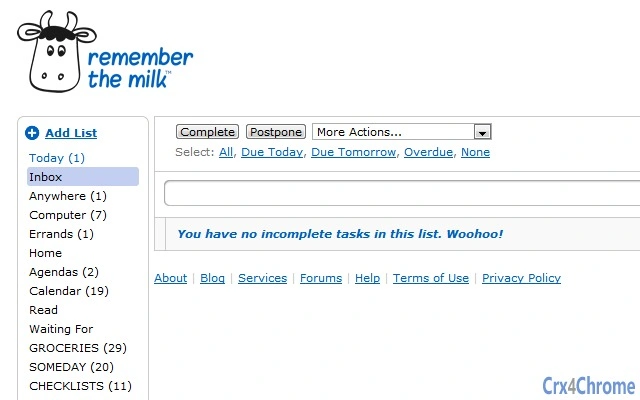
The extension integrates seamlessly into the existing Remember The Milk interface, enhancing it without disrupting the original layout. The UI remains clean and minimal, with subtle improvements such as left-aligned list tabs, resizable task lists, and visual task counts. Navigation is intuitive, with clear feedback on actions like list switching or task movement.
Workflow efficiency is significantly improved through keyboard-driven interactions. Users can perform common tasks—such as switching lists, moving tasks, or adding new ones—without leaving the keyboard. This supports a flow state, particularly beneficial during high-productivity sessions. The drag-and-drop delay feature prevents unintended actions, especially useful on touch-enabled devices or when using precise input methods.
Performance observations are based on general software behavior patterns. The developer did not specify resource usage details. However, given the extension’s lightweight nature and focus on interface enhancements rather than heavy processing, it is expected to have minimal impact on browser performance. Stability appears to be maintained through regular updates, with bug fixes addressing loading issues and exceptions in search functions.
Compatibility & System Requirements
The A Bit Better RTM extension is compatible with Windows, Mac, and Linux operating systems, ensuring broad accessibility across desktop environments. It supports modern web browsers, including Chrome and Firefox, as well as platforms that support Greasemonkey-style scripts.
The software version is 0.0.2.14, utilizing the v2 manifest file format, which indicates adherence to current extension standards. The installation size is 1.2 MB, a compact footprint that minimizes storage impact. The developer did not specify exact system requirements, such as minimum RAM, CPU, or browser versions. Compatibility information was partially provided, with support confirmed for Chrome and Firefox through the extension’s update history.
Pros and Cons
Pros
- Lightweight and fast, with minimal impact on browser performance
- Intuitive keyboard shortcuts improve navigation and task management speed
- Enhanced visual layout with resizable lists and task counts
- Configurable settings accessible directly within RTM’s interface
- Regular updates address bugs and improve compatibility
- Supports multiple platforms: Windows, Mac, and Linux
Cons
- Requires a web-based RTM account; not a standalone application
- Depends on browser extension support; may not work on all platforms
- No official documentation or user guide provided
- Some features require familiarity with keyboard shortcuts for optimal use
- Compatibility with future browser updates is not guaranteed
FAQ Section
Is A Bit Better RTM compatible with all browsers?
The extension is confirmed to work with Chrome and Firefox, and supports platforms that allow Greasemonkey-style scripts. Compatibility with other browsers may vary and is not officially guaranteed.
Is the extension safe to use?
As a browser extension, it operates within the browser’s security model and does not access local files or sensitive data. It only modifies the RTM interface in the browser tab. Users should ensure they install it from trusted sources.
How do I update the extension?
Updates are automatically managed by the browser’s extension store. Users will receive notifications when a new version is available, such as version 0.0.2.14.
Does the extension require a license or payment?
No. The A Bit Better RTM extension is completely free to use. It does not require a license key or subscription.
Can I use it offline?
No. The extension requires an active connection to the Remember The Milk web service to function. It cannot operate without an internet connection.
Final Thoughts
The A Bit Better RTM extension delivers a meaningful upgrade to the Remember The Milk experience by focusing on usability, speed, and customization. Its keyboard shortcuts, visual refinements, and workflow optimizations cater to power users who value efficiency and precision in task management. While it does not replace the core RTM platform, it enhances it in ways that significantly improve daily productivity.
Users who manage multiple projects, rely on keyboard navigation, or seek a cleaner interface will benefit most from this tool. It is a smart, lightweight addition that respects the original design while making it more functional. For those already using RTM, this extension is a must-have for maximizing workflow potential.
Download A Bit Better RTM now







